Above Forum Ad

Collapse

Announcement

Collapse
No announcement yet.

Mk2 Tiguan VCDS Tweaks

Collapse
This is a sticky topic.
X
X
 
  • Filter
  • Time
  • Show
Clear All
new posts

  • Guest001
    replied
    Originally posted by phonebooth View Post
    Hillbilly did you manage to get your traffic sign recognition working? I activated mine tonight via long coding and appears to work ok. Although I've got a fault in the information control unit stating "Function limitation due to missing message" do you have the same? Appeared after activating.
    Get a similar message to what Simon says occasionally sort of says working in limited mode or similar but goes away on its own. The overspeed message does work however and mine is set at 15 over but i turned off the chime

    Leave a comment:


  • Simonr23
    replied
    You’re probably getting ste standard message that happens in aus(many countries) due to the lack of syncing the signs it visualises vs an ‘authorised’ database of gps coordinated speed data to use in conjunction.

    In Europe, this speed sign system is more advanced. It allows for speed limiting (cruise control changes speed automatically- cool feature) based on the signs it sees AND in the database from gps data. I think it is also capable of auto braking for corners on major roads.

    Because we don’t have that data in our gps info, the system tells us at each startup, that it’s working in a limited mode(visual recognition only)

    Leave a comment:


  • phonebooth
    replied
    Hillbilly did you manage to get your traffic sign recognition working? I activated mine tonight via long coding and appears to work ok. Although I've got a fault in the information control unit stating "Function limitation due to missing message" do you have the same? Appeared after activating.

    Leave a comment:


  • Guest001
    replied
    Originally posted by PDMJO View Post
    Glad you finally got it sorted. Unfortunately sometimes you need to do some fiddling around.

    Hopefully it works for you on Sunday when you test it out. Make sure you’re over 65km/h (whatever the speed at which ACC engages is)
    Why does it only enable at that speed and above?? Was looking at another forum and they were talking about getting it to operate at a lower speed but didnt say how.

    Leave a comment:


  • PDMJO
    replied
    Originally posted by Hillbilly View Post
    Have changed that but I guess I will have to try to recode the whole thing as after I got the 'Not supported" notice it looked like the settings I changed had reverted back to original. Will be using it ant night on Sunday so we will see

    UPDATE

    SUCCESS


    Had to change a couple of things Like extra headlight LED and do what you said and it shows the correct symbol in the dash anyway, when I have headlights on and push the stalk away from me


    couldnt figure out how to get the A5 to show in hex but worked out little sign in top of phone screen changes it into hex from English.

    I changed it as you did but also did the hex settings and iit seems to have done it Now to see if it works on Sunday

    To be perfectly honest in the video that supposedly shows it working I couldnt tell the difference between it on or off
    Glad you finally got it sorted. Unfortunately sometimes you need to do some fiddling around.

    Hopefully it works for you on Sunday when you test it out. Make sure you’re over 65km/h (whatever the speed at which ACC engages is)

    Leave a comment:


  • Guest001
    replied
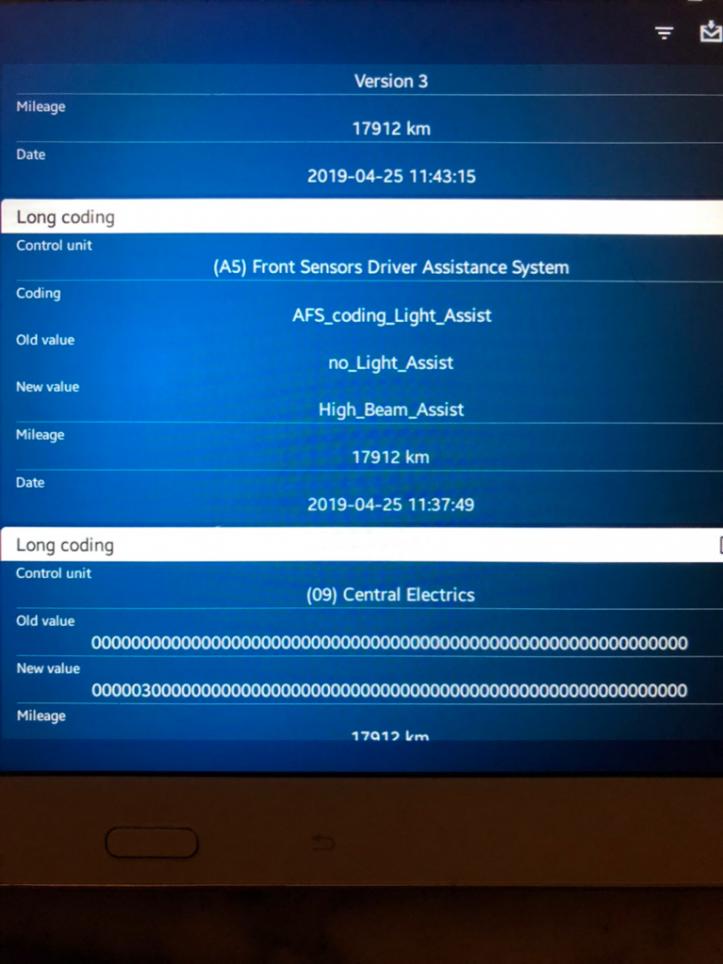
    Heres the history of what I did
    Attached Files

    Leave a comment:


  • Guest001
    replied
    Have changed that but I guess I will have to try to recode the whole thing as after I got the 'Not supported" notice it looked like the settings I changed had reverted back to original. Will be using it ant night on Sunday so we will see

    UPDATE

    SUCCESS


    Had to change a couple of things Like extra headlight LED and do what you said and it shows the correct symbol in the dash anyway, when I have headlights on and push the stalk away from me


    couldnt figure out how to get the A5 to show in hex but worked out little sign in top of phone screen changes it into hex from English.

    I changed it as you did but also did the hex settings and iit seems to have done it Now to see if it works on Sunday

    To be perfectly honest in the video that supposedly shows it working I couldnt tell the difference between it on or off
    Last edited by Guest001; 03-07-2019, 07:23 PM.

    Leave a comment:


  • PDMJO
    replied
    Originally posted by PDMJO View Post
    Ok so here’s where I deviated from the AutoInstruct guide:


    I either did that instead of ticking the bytes, or I did it in conjunction with it... but I believe I did the former.


    Sent from my iPhone using Tapatalk
    To clarify on my own post, I seem to have done this instead of the front sensor control unit byte.

    Leave a comment:


  • Guest001
    replied
    Thanks for that Will have a look at mine but mostly I didnt get that far into the coding to be able to.

    Leave a comment:


  • PDMJO
    replied
    Originally posted by Hillbilly View Post
    History is in your phone Dont need to be connected to read it. Whenever you can will be good though
    Ok so here’s where I deviated from the AutoInstruct guide:


    I either did that instead of ticking the bytes, or I did it in conjunction with it... but I believe I did the former.


    Sent from my iPhone using Tapatalk

    Leave a comment:


  • Guest001
    replied
    Originally posted by Simonr23 View Post
    I know that via obd11/vcds you can change which dash theme is displayed on the v1 AID- from several vw models.

    This looks to be the same?
    Usually its coded for the model you get it in mine has the Rline logo

    Leave a comment:


  • Simonr23
    replied
    I know that via obd11/vcds you can change which dash theme is displayed on the v1 AID- from several vw models.

    This looks to be the same?

    Leave a comment:


  • PDMJO
    replied
    Maybe those with the new AID / a proficient understanding of Russian can shed more light on this, but it seems like the interface can be adjusted?


    Sent from my iPhone using Tapatalk

    Leave a comment:


  • Guest001
    replied
    Originally posted by PDMJO View Post
    I’ll try remember when I get home from work tonight.
    History is in your phone Dont need to be connected to read it. Whenever you can will be good though

    Leave a comment:


  • PDMJO
    replied
    Originally posted by Hillbilly View Post
    You can go through "History" in OBDII and see what it was that you did. mIght be helpful for us
    I’ll try remember when I get home from work tonight.

    Leave a comment:

Working...
X