-
+1 with mine working fine too. as of a week ago I got the 'service in xxxxkm' notification. I click OK and it goes back to the polar fis screen. -
Mine worked fine when I was overdue for service...
Post on the auto polar forumsLeave a comment:
-
Not sure if it's operator error yet but I'm having issues with mine. I updated to the correct white dot 3.2 firmware and the install went well. I even got the mirror dip to work. I synchronised it as per the instructions but have found that after I lock my car and come back later the unit is not connected any more. The only thing I can think of is the vehicle is overdue for service and the message is appearing when I start the car. Maybe this is affecting it as instead of the Polar screen I get a status screen saying overdue for service by 150 kms!
If I reset the unit by unplugging it and reconnecting then the diagnostics connected message comes up on the RNS and the system works. However, the radio now shuts off after 30 minutes like it is not registering it is on when the vehicle is being driven.
Any ideas?Leave a comment:
-
Sounds like I need to upgrade then, some of those bugs are affecting me.Leave a comment:
-
Up to date there's been mostly bug fixes and resolving compatibility issues with specific combinations of BT/radio. There's been a few (minor) enhancements, however focus has been primarily around ensuring compatibility with the large range of OEM and aftermarket BT and radio combinations.Originally posted by Ryan_R View Post
Latest version 0.3.3b0 has the following features:
[+] allows you to turn on/off the screen number flashing when changing screens
[+] Fixes remaining fuel litres not displaying correctly
Update v0.3.2 [22-12-2012]
***Improvements / Update description for RED cluster ***
[+] Improved communication with White Dot Hands free BT units
[+] Solved issues with Parktronic and Climatronic emulations that causes deactivations
[+] Solved issue displaying Serial number and Firmware version in screen
[+] As requested by users, added one decimal digit to PSI readings
[+] Improved diagnostic communications
[+] Other minor bug/issues solved
*** Improvements / Update description for WHITE and COLOR cluster ***
[+] Improved communication with Hands free BT units
[+] Solved issues with FISCON BT units.
[+] Solved issue displaying Serial number and Firmware version in screen
[+] Improved chronometer configuration screen for start and end speeds, now keeping pression OK button speed increases.
[+] Improved activation in some models of gateways that causes that Telephone menu doesn't be available after installation of the box.
[+] As requested by users, added one decimal digit to PSI readings
[+] Improved diagnostic communications
[+] Other minor bug/issues solved
Update v0.3.1 [03-12-2012]
RED FIS
Firmware : [PF03] FIS_Adv_v0.3.1R (Red_dot)
[+] Improved test alignment in main screen of Polar FIS
[+] Improved White Dot BT emulation function
[+] Improved issue that doesn't show some parameters in the Acceleration chronometer
[+] Improved german and czech translations
[+] Added reset function in the configuration menu (this resets whole box, but not adjustements stored)
WHITE & COLOR FIS
Firmware : [PF03] FIS_Adv_v0.3.1W (White_Color_dot)
[+] Improved communication with OEM BT Handsfree
[+] Improved issue that doesn't show some parameters in the Acceleration chronometer
[+] Improved german and czech translations
[+] Added information screen when change desktop showing desktop selected
[+] Added reset function in the configuration menu (this resets whole box, but not adjustements stored)Leave a comment:
-
Haven't upgraded my f/w in a while now - how many new versions have their been? Any knockout new features?Leave a comment:
-
BlueTooth Compatibility Function
Has anyone looked at using the bluetooth compatibility function yet? This is mainly for people with a red MFD and wanting to run the latest bluetooth units.
Here's some additional info on this function:
What is compatibility with hands-free OEM units?
This emulation allows mounting the latest BT for white MFD in a vehicle fitted with red MFD and to see the Phone menu in the MFD.
What are the advantages of BT units for white MFD?
The main advantage of later BT units is AD2P audio feature which lets you play music through the phone and listen through the speakers of the car radio.
Apart from this, the control units for white MFD are equipped with later chips and newer versions of software so that its operation is more stable and effective.
How can I enable this compatibility mode?
After entering the setup menu for Polar FIS, go to the menu DISPLAY-> DISPLAY-> EMUL. BT and then activate the function. After activated, the function is not available immediately as it needs to be enabled. You must turn off the vehicle and wait 1 minute after the screen goes blank in the MFD. From then you can restart the vehicle and the unit will now run correctly. This step is only necessary after enabling this function for the first time.
IMPORTANT NOTE : Polar FIS only performs the function of supporting the BT unit to create Phone menus in the MFD. All functions including Agenda, connection, audio AD2P ultimately depend on the compatibility of the phone and radio, as in the other ECUs BT, Parrot, etc.
Videos of compatibility of BT (working with red MFD)
NOTE : All videos are from a SKODA vehicle with red MFD (which is white just to confuse everyone).
(Basic BT Unit - Enabling the option)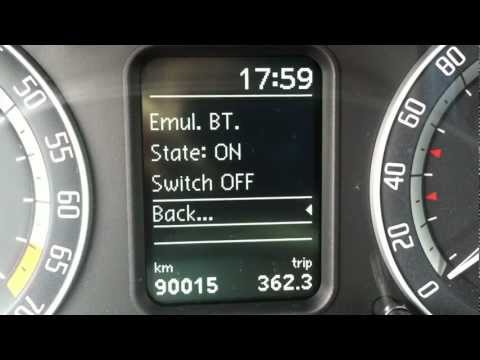
(Basic BT Unit - Working)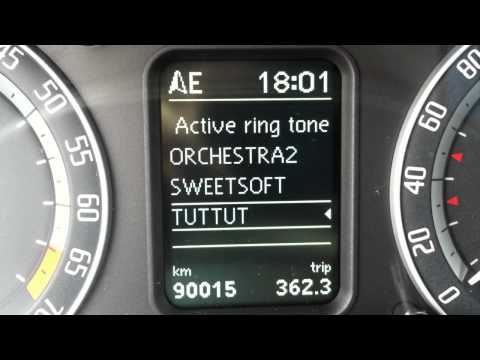
Leave a comment:
-
yep, been looking at this. looks quite good, and uses iGo for the nav system. Only issue I can see is ongoing bugs with the music interface, particularly for iDevice integration, Hopefully they get resolved soon.Originally posted by AdamD View Post
would be great to see the OBD data displayed in a dial / slider bar format (rather than just numbers).Leave a comment:
-
So I know this is the Autopolar thread, but for those who are looking for a completely integrated solution that displays data on the head unit, the upcoming ANS-810 replacement might fit the bill for some. See this post.Leave a comment:
-
I didn't get any interest and it was sitting on my desk... so here we are
Will see how I got with it back in there, the short drive I have had to make sure it works and the new firmware looks a little better than the old.Leave a comment:
-
I relented today and put the unit back into my car (after a firmware upgrade)
I have to say the install through the cabin is just a wee bit easier (and quicker). Both the PolarFIS+ and the CANBUS box are now sitting in that little drawer so access in the future is very simple.Leave a comment:
-
If anyone feels like taking a bunch of photos of each of the screens I could write up a user guide for them as well, save them a job.Leave a comment:
-
Last of the group buy units are up for grabs - see here for details
If you own an EOS, Passat or Scirocco (or know someone who does) and are prepared to do a write-up on one of these vehicles (i.e. take a couple of photos while doing the install) please let me know as I'll do a "special deal" so that future installers in these vehicles have a guide.Last edited by tigger73; 28-12-2012, 08:36 PM.Leave a comment:

- If this is your first visit, be sure to check out the FAQ by clicking the link above. You may have to register before you can post: click the register link above to proceed, registering will remove the in post advertisements. To start viewing messages, select the forum that you want to visit from the selection below.
Your Supporter or Sponsor Subscriptions will expire soon.
We hope you will choose to stay with us!
This means you should apply for your renewal now to avoid
any disruptions to your membership whilst the renewal process is taking place! NOTE: If you have an auto renewing subscription this will happen automatically.

Leave a comment: