

Thanks guys for pointing out the settings in the sat nav. I was everywhere in the vehicle settings to find this setting and couldnt find it. Now it works perfect with the audio disabled. It's nice to have the sign displayed on the instrument cluster. In regards to the stop start, I have seen those cables from aliexpress but I'm the same as you and don't want to try prying off the consoles and leave screw driver marks and ruin the panel. Today I tried to increase the voltage to 12.5 or even 13v and it wouldn't accept those figures. I have read you can disconnect the 2 wire connector at the battery but I don't want to go down that path as who knows what other system needs the battery voltage to function correctly.
Does anyone know of a VW manual or document which has every system and all its sub systems and options that are in the adaptations or long coding pages. I'd hate to think to try nut a lot more codes out you need to have the battery connected to a battery charger. It would be nice if there was a document and you could go thru it page by page and see if there are things you might want to play with.
-
Another thing is which camera version it has. The Skodas have changed from one that had designation 03 to one with 02 and no one knows the correct coding to get TSR in the AID working and believe me Ive tried. Also S/S may appear to work but there are a lot of things that turn it off temporarily.Originally posted by Flipper Dog View Post
Same as TSR, I thought I had it working but it isnt despite best efforts in several modules. Only way for S/S is the cheat cable from AliExpress which I have but cant get the switches out to attach itLeave a comment:
-
If you are getting a beeping for your speed signs than you may have the speed warning activated. Also it sounds like you have the show on map also active for the signs to come up on the MIB main unit.
Go to navigation and touch the two clogs for settings, open route guidance, scroll all the way down to road signs, and then you should have the road sign settings. This will allow you to turn off the display in the MIB and turn on/off the speed warning. That should be your beeping.
If you turn the warning off and it is now ok then have another go with TSR. Be sure to set it to detection mode not fusion. Signs should appear in the dash display without the audible warning.Leave a comment:
-
One strange thing is happening with this car and the engine start/stop feature. The misses took it for a drive in the morning and said it was still normal (engine cutting out etc), but the traffic sign recognition is a pain in the ass with the constant beeping. I then took it for a drive and funny enough the engine wouldnt cut out at the lights and I thought she must have been imagining it. Then I took it for another drive and confirmed that the engine does not cut out, so I was very happy the mod worked. I then took the car for a drive to work tonight just to test the traffic sign recognition system and yep, its bloody annoying especially in Melbourne CBD with 30 & 40km/h zones, but this time the engine did cut out when I stopped at the lights. So it seems some journeys it doesn't cut out, and others it does.
I then went backwards thru the traffic sign recognition setup and undid all the steps. The car no longer displays the speed signs on the instrucment cluster, but it still displays it on the sat nav with the annoying constant beeping. I have gone over it twice to confirm everything is disabled and it is. I can't ever remember if it was normal for the factory sat nav to show the speed signs as I always use waze. Now thinking about it, I started at the start and put everything back to normal config. Should I have started from the end to reset it all back to normal.Leave a comment:
-
Yeah I have noticed there is no coding section like some of the screenshots from this topic from back in 2017. Only long coding and not able to get to the bytes or bits to modify anything. A bloke on FB says to try adaptations - function_configuration_hmi - then the initial disclaimer and legal disclaimer are in there to disable. I will try tomorrow.Originally posted by Flipper Dog View Post
Just tried it and it is in there, have now switched it off and also in this section is the screener which I changed to "6" so I have the R line logo on boot up of the unit.Last edited by Pezzaano; 15-11-2021, 12:16 AM.Leave a comment:
-
Doesnt do it in the Amunsden MIB3 in our Kamiq Just starts up like the old 510's did.. Same unit a s the VW Columbus isnt itLeave a comment:
-
2021 Tiguan with MIB3 ?
Good luck in finding the answer, as the option appears not to be available now.Leave a comment:
-
Does anyone know the trick to disable the sat nav warning on start up. I am unable to turn it off with the instructions provided in other posts on my 2021 tig. Am trying to word search the forums for other ways. ThanksLeave a comment:
-
Are there any VCD tweaks that change the 162KW limit on the entertainment systems "Performance Screen" I've had the car tuned and would love to be able to change this!Leave a comment:
-
Mk2 Tiguan VCDS Tweaks
I only changed the Adaptation on my Dad’s 2020 model and worked without an issue. If LKA is on and not in the dials, the R logo gets replaced by the mini LKA in the bottom center when driving.
Sent from my iPhone using TapatalkLeave a comment:
-
Looks like from his post ELM327
Sent from my iPhone using TapatalkLeave a comment:
-
There is an APP in OBDEleven that gives you the choice of 4 Rline ot R icons.
What are you using to try and do it. Carista or some other toolLeave a comment:
-
All I can say is it was performed with OBD11 and under Adaptations not Long Coding. I don’t have access to his car any time soon. I don’t believe an Adaptation change will impact long coding values, case and point would be 09 controller is all Adaptations and Long Coding is all 0s since 09 no longer uses Long Coding for changes and when a change is made in 09 Adaptations there is no change to the Long Coding value. Maybe at the time on the Golf it was a Long Coding change, but the Gen 2 dashboard controller this change is now found under Adaptations.
Sent from my iPhone using TapatalkLeave a comment:
-
Try this? This is from my Dad’s history.Originally posted by InsaneAsylum
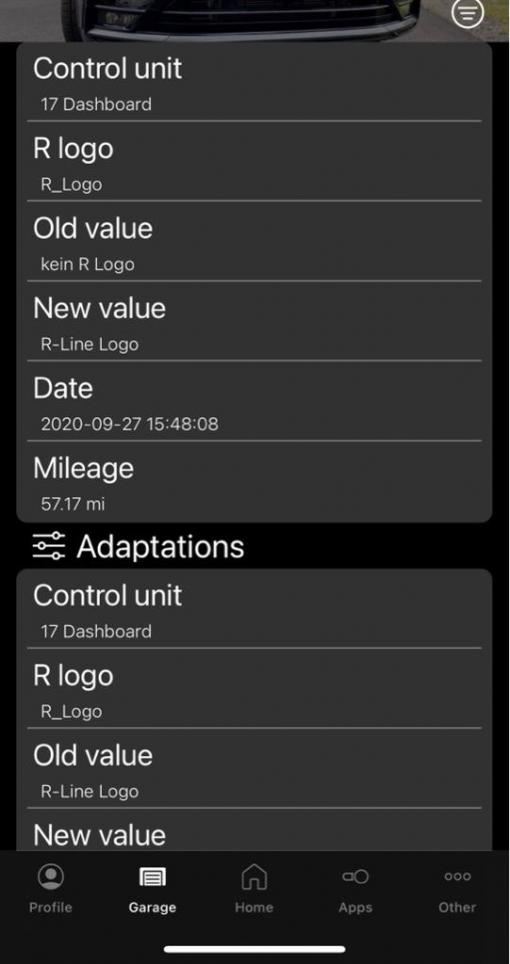
Sent from my iPhone using TapatalkLeave a comment:
Leave a comment: