

hdd fail
Hello and thank you all for sharing with us your knowledge.
I will itemize all of my history because I dry a little.
I bought a bit ago rns 510, 1T0 035 680 hw 0520 down motherboard and I replaced a motherboard firmware B version HW11 3980 which is happening in D.
It works very well indeed, the concern is that I've realized that my Hitachi HDD is faulty, not detected in media and on my pc.
So I installed another hdd ide 2.5 inch a place and that, it is detected, I can even copy mp3.
My problemis that I wanted to format my new hard drive to install v9 card.
I do not own the image of the old hard drive and it is impossible for me to gain recognition on my pc because it tells me not initialize status.
When I load any version of that 1100 or 2660 I authorize the downgrade on the RNS 510, the update starts, but I do not see the gateway appear in the progress bar or the hosts or APPS or HDD,
RADIO, MPEG only SWL bar starts, and the final installation of the unit tells me error ecu.Txt error hw version of I precise that when I run the recovery cd, my car radioback in operation, but still with the non-partitioned HDD.
Another problem noted yesterday, my car radio isnot recognized in my vehicle, I said, no sound, not to tune, however thenavigation function works very well on the DVD only
And VCDS along coding gets error 31 request out of range, even in the two bytes missing.
I precise that my new HDD is format the drive to ntfs and I create a ntfs partion in thisproblem arises there also.?
There was there a firmware that solves this problem?
My new HDDis to blame?
Thank you for caring about my problem.
Thank you very much.
-
Not had any issues with MDI, but depends on whether you have Dynaudio and/or coded your RNS510 properly in terms of loudness.
If you do go down the MDI route ... what I'm saying is stick with an ipod as opposed to a hard drive.
The in-built playlists, album and artist sorts on the iPod are immediately available on your RNS510 display once connected.
No need to play silly buggers and create folders to organise your music yourself on a SD card or hard drive.
The unit is slow to process content within multi-layer of folders!
So the idea is to leave all that processing to the iPod which has no such problem.Last edited by aussietig; 24-03-2013, 08:08 AM.Leave a comment:
-
I don't have an Ipod, or I anything else so that let's me out. I don't update my music just add to it, the only thing I change often is audio books and I keep them on an SD card for convenience. The reason for that is I can leave the book and use the HD when someone else is in the car or I want to listen to music without losing my spot in the book. I do agree that the loading of music on the HD is a laborious process and there should be a data port for that purpose. I guess the other option is use MDI and hook up an SDD to that but I have heard some people have had issues with the sound quality of the MDI.Originally posted by aussietig View PostLeave a comment:
-
That's why my tip is to load your music collection onto a classic iPod and have that permanently hooked up via MDI.
Storing music on the HDD is just too long of a process and PITA if you're one that upgrades your FW at every opportunity that arises.Leave a comment:
-
I have found with mine that the boot times get longer, substantially so as you load more onto the drive. I have about 55 gig on it now and it can be quite annoying but then the problem was created by me so I am not complaining. It will be interesting to see how long it takes when it gets more on it, perhaps the load times will become a factor then to the point it becomes not worthwhile. Mine BTW is 126 Gig I think.Leave a comment:
-
During my initial investigations when trying to modify the partition scheme I tried half a dozen different clone tools.
Also tried manually editing the partition table with a hex editor.
However the RNS uses a proprietary file system that none of the tools I tried was able to recognize: the Vienna Flash File System.
Its possible that this Clonezilla tool may work I am not familiar with it personally. However I spent a great deal of time going down this route until deciding it was a fruitless task and then moving on to the much easier method that I discovered actually works - namely modifying the firmware load scripts.
An SSD will not make any difference to the speed of the unit except when browsing your music library.Leave a comment:
-
For those having trouble with SSD, wondering if they have tried disk cloning. I have been using Clonezilla live CD on PC drives for Windows PCs. Free and open source from Taiwan National Center for High-Performance Computing. Clonezilla can automatically clone with partition resize. Should work with USB-IDE adapter. I have those multi USB-IDE/SATA cables which work with Clonezilla for sata. Developer seems to regularly read Clonezilla forums and is there to help with bugs/issues.
I'm only using the radio and nav on RNS510, and would consider upgrading if it improved performance. From what I've read here, boot time is limited by firmware and unchangeable. What about nav responsiveness, which depends on map data - is it noticeably faster?Leave a comment:
-
RNS-510 HDD replacement/SSD swap DIY
Foogy...exactly same problem as you buddy. I've just put the damn drive in an old pocket sized caddy for use as a portable. So not all bad. Gutted tho.Originally posted by kamold View Post
Thanks btw Kam. Your fw is still a huge hit for me.Leave a comment:
-
Re: RNS-510 HDD replacement/SSD swap DIY
It is a Kingspec IDE SSD 64 gb.
The drive had no partitions on it had the only firmware listed on the Kingspec website.
As both myself and HumbleGT have had problems with recent drives, it is going into an old laptop now, as I don't think it is suitable for the RNS510.
Thanks for you help kamoldLeave a comment:
-
Re: RNS-510 HDD replacement/SSD swap DIY
Sounds like the same issue HumbleGT is having in the UK. Are they kingspec pata ssds? What size?
I would see if there is a firmware update for the drive maybe, and make sure the drive has no partition table on it at all before putting it in the rns.
Sent from my HTC One X using Tapatalk 2Last edited by kamold; 27-12-2012, 09:03 AM.Leave a comment:
-
Re: RNS-510 HDD replacement/SSD swap DIY
There is no jumper on it.
It shows up as the correct type of drive in my laptop, and it seemed to show up as installed when in the unit. I have tried it in 2 different units with the same result, one F and one H unit.
I am starting to wonder if the drive is the problem, I will run a full disk check on it and ensure that all partitions are wiped.Leave a comment:
-
Re: RNS-510 HDD replacement/SSD swap DIY
Make sure there is no jumper on the ssd drive. Have you tested the ssd in a pc?
Sent from my HTC One X using Tapatalk 2Leave a comment:
-
Re: RNS-510 HDD replacement/SSD swap DIY
I am obviously doing something wrong, but I have no idea what.
When I have put the unit back into the car after swapping the hard drive over, I can't get the unit to reinstall the firmware or format the new drive.
I put the CD in and it just spins. I then can't eject it and rebooting the unit has no effect.
As soon as I put the old hard drive back in I can eject the disc.Leave a comment:
-
RNS-510 HDD replacement/SSD swap DIY
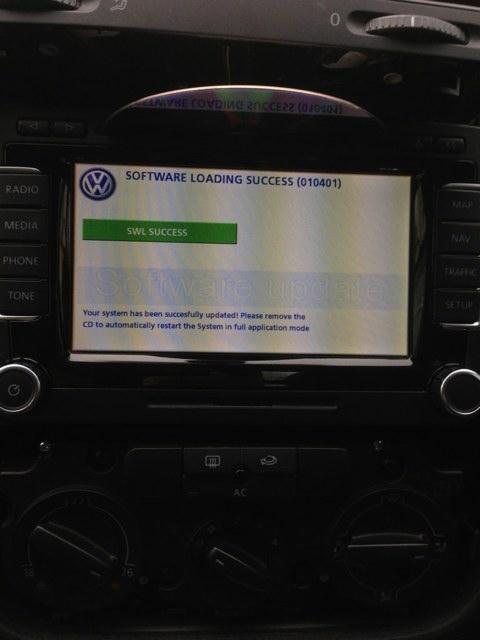
Ok, so I can report that installing the SSD did not work.
I went to install the fw 3810a on it but no drive was recognised. I removed the SSD and put the HDD back in and it worked fine.
I have successfully updated the original HDD to 3810a with v9 western euro maps.
I have now placed the SSD in an enclosure with a view to having tools diagnose any potential issues and possibly zeroing out the drive before reinstalling it in the rns for another go...
Again I shall report my results.
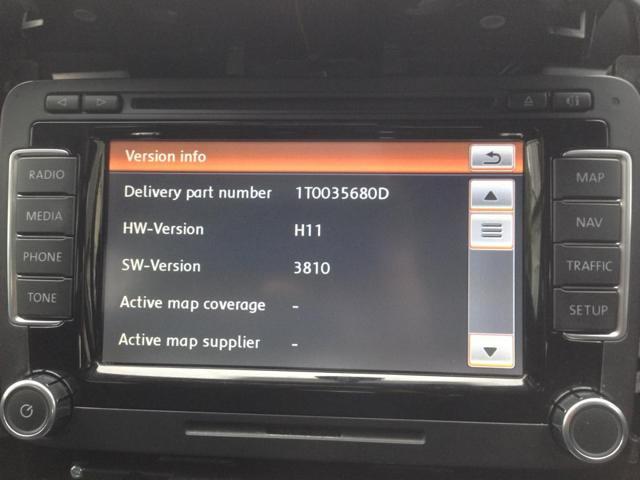
My B unit currently reports as below:
Leave a comment:
-
RNS-510 HDD replacement/SSD swap DIY
Hello chaps...resurrecting an old thread I know however, the wealth of knowledge offered in this one thread alone cannot be over stated.
I'd like to add my two pence to it.
First off, thanks to JohnC for the awesome guide. I was able to follow it without a hitch. In fact, due to coming up against some obstacles I've had to use the guide a good few times so now I'm quite adept at doing so...with NO screws left over afterwards...bonus!!!!
Anyway...if I can add ONE piece of advice when preparing to do this upgrade is to ENSURE ANY CD/DVD IN THE DRIVE IS REMOVED "BEFORE" COMMENCING!!!!
Not doing so resulted in me having a DVD stuck in my unit with no way of retrieving it. I believe this was due to the unit having no controller because the freshly installed SSD had NO software/firmware on it! Ok, so panic aside...I put the old HDD back in the unit, reinserted it in the car and straight away it spat the disc out.
I've now reinstalled the SSD back in the RNS510 and I shall report back shortly how the fw n maps install goes.
I have a B unit currently on 1120. Kamold has kindly created n supplied a "Firmware 3810 for older RNS510 units (known as A and B) that has tables swapped to prevent battery drain with older CANbus gateways. Firmware has been modified to create 75/20/5 % partition ratios for music/maps/POIs respectively.
Also has VIM and secret menu enabled".
That's a direct quote from www.rnsfirmware.com.
I have a 2007 VW Golf GT Sport 170 TDi with a B unit.
I shall report back the result of this fw and western Europe v9 maps update shortly.
CheersLeave a comment:
Leave a comment: