Above Forum Ad

Collapse

Announcement

Collapse
No announcement yet.

Polo 6C VCDS Coding

Collapse
X
 
  • Filter
  • Time
  • Show
Clear All
new posts

  • Polo 6C VCDS Coding

    VCDS is fairly limited out of the box on the 6C.

    Looking to add some features, and specifically the auto-lock/unlock feature. Have it on all the other VWs in the family, yet the 6C Polos don't have it, nor can I find it in the long coding menus.

    Anybody have any ideas how to specifically code those?
    Current: 2023 MY23 T-Roc R Lapiz Blue + Beats Audio + Black pack 2018 MY19 Golf R manual Lapiz Blue + DAP) 2014 Amarok TSI Red (tuned over 200kw + lots of extras) 2013 Up! manual Red 2017 Polo GTI manual Black Previous VWs and some others ...

  • #2
    Hey Sharkie,

    If your Polo has the same central locking button as the Golf MK7, you might be able to program it without VCDS. With the car running, just keep the lock button pressed for around 10 seconds or so, and it should enable auto-locking once the car reaches 10 or20 km/h, I don't remember properly.
    Golf Wagon MK7 (90 92TSI) - Mods: DQ250 swap (Stage 2), 110TSI turbo upgrade (Stage 2), Bilstein B12, 19" Pretoria, GTI PP sway bar upgrades (front/rear), full GTI tartan interior, GTI colour cluster, R Bi-Xenon headlights with AFS retrofit, GTI brake upgrade.
    More to come...

    Comment


    • #3
      Originally posted by Sharkie View Post
      VCDS is fairly limited out of the box on the 6C.

      Looking to add some features, and specifically the auto-lock/unlock feature. Have it on all the other VWs in the family, yet the 6C Polos don't have it, nor can I find it in the long coding menus.

      Anybody have any ideas how to specifically code those?
      Sharkie: Hi.

      "VCDS is fairly limited out of the box on the 6C" - why do you say this?

      Hmm........ if your Polo 6C has a 6C0-937-089 series BCM and assuming that your words, "the auto-lock/Unlock feature" means the car doors automatically lock when the car reaches a threshold forward speed - then the tweak should be simple as follows:
      • IDE05142-ENG115756-Access control-automatisches Verriegeln bei Geschwindigkeit > active
      Don
      Last edited by DV52; 22-12-2025, 08:10 AM.
      Please don't PM to ask questions about coding, or vehicle repairs. The better place to deal with these matters is in the forum proper. That way you get the benefit of the wider expertise of other forum members! Thank you.

      Comment


      • #4
        Originally posted by DV52 View Post

        "VCDS is fairly limited out of the box on the 6C" - why do you say this?

        Don
        On many VW models, the long coding helper menus have various options to pick from and it is fairly easy to get most "basic" things done. For the 6C Polos almost none of those shortcuts exist.
        Current: 2023 MY23 T-Roc R Lapiz Blue + Beats Audio + Black pack 2018 MY19 Golf R manual Lapiz Blue + DAP) 2014 Amarok TSI Red (tuned over 200kw + lots of extras) 2013 Up! manual Red 2017 Polo GTI manual Black Previous VWs and some others ...

        Comment


        • #5
          Thanks to Don's post on enabling the auto-lock feature, I was able to find more info, so for the sake of completeness, here are the steps needed to fully enable this feature:

          Using VCDS:
          1. Got to Control Module 09 (Cent. Elect.)
          2. Select Adaptation
          3. find and modify the following 3 channels as follows:
          a. "IDE05142-ENG115756-Access control-automatisches Verriegeln bei Geschwindigkeit" change to "active". This enables auto-lock once the car reaches 15km/h (thanks to Don)
          b. "IDE05142-ENG115756-Access control-automatisches Entriegeln" change to "active". This enables auto-unlock when you pull the key out of the ignition.
          c. "IDE05142-ENG115756-Access control-Menuesteuerung ZV Autolock-Unlock" change to "adjustable". This will enable a menu in the setup screen on the radio to the above via the menu,
          4. Click Do-it.
          5. Note security access code (31347) will need to be entered prior to commencing the process.
          Current: 2023 MY23 T-Roc R Lapiz Blue + Beats Audio + Black pack 2018 MY19 Golf R manual Lapiz Blue + DAP) 2014 Amarok TSI Red (tuned over 200kw + lots of extras) 2013 Up! manual Red 2017 Polo GTI manual Black Previous VWs and some others ...

          Comment


          • #6
            Originally posted by Sharkie View Post

            On many VW models, the long coding helper menus have various options to pick from and it is fairly easy to get most "basic" things done. For the 6C Polos almost none of those shortcuts exist.
            Sharkie:First -well done on implementing the "auto door-close" tweak and even more kudos for identifying those other adaptation channels !!

            OK - now for your long-code comment: because you say "almost none of those shortcuts exist" - I assume that the BCM in this car has an active long-code facility. The Polo 6C had a quasi MQB platform design - but in the later model (i.e. the 3Q0 chassis), the BCM in the Polo did NOT have an active long-code. In this newer model, VCDS reports either a long-code with a zero-string, or the VCDS long-code is entirely missing - and ALL the "options" (this is your word - but I prefer the more common term, "Bit") that were in the older BCM long-code were transferred into adaptation channels!

            So which version VCDS device are you using and more importantly - which version VCDS software are you using?

            I ask because I suspect that you might be only using the traditional Ross-Tech "GREY" long-code helper screens. If I'm correct, I suggest that if possible you abandon these screens and instead use the so-called "experimental YELLOW" long-code helper screens. I have absolutely NO idea why Ross-Tech calls these YELLOW screens "experimental" - other than to promote their own GREY screens. However, my experience is that there ain't nothing "experimental" about the information in the YELLOW screens because exactly the same data is shown in other diagnostic devices like ODIS, Vag-Com-Pro and OBDeleven.

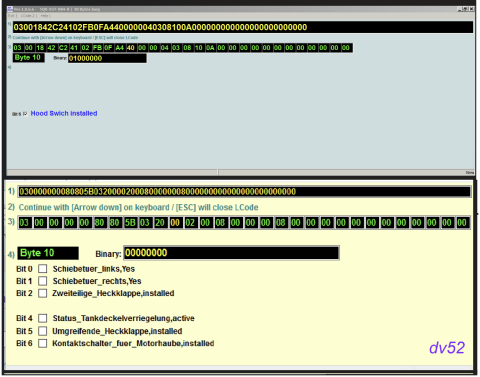
            I include below an example of the difference between the YELLOW and GREY VCDS long-code helper screens to demonstrate the usefulness of the former - in this case, both VCDS screens refer to Byte 10 on a Golf mk7 BCM (clearly the earlier version BCM that had an active long-code facility):


            As you can see -the GREY screen has only ONE Bit-descriptor whereas the YELLOW screen shows SIX Bits! Of course it's not always the case that the YELLOW screens show more Bit-descriptors - but it is generally so in my experience! And it's not always the case that the Bit descriptors on the YELLOW screens are in German- but when this happens, a quick translation is all that's needed!

            So, maybe upgrade the VCDS software to the latest release and if your Polo 6C has the YELLOW screens, I suggest that you try searching again using the YELLOW long-code helper data.

            Don

            PS: As an additional explanation and with the aid of Copilot - on some cars (predominantly MQB platform), the YELLOW screens in VCDS (and in some ODIS documentation) correspond to a specific internal VW documentation category called "NE‑Technik" or, "NE-Tech" which is short for Neue Elektrik/Neue Elektronik meaning “New Electrical/New Electronics”. This is VW’s internal label for the post‑2012 electrical architecture, which includes stuff like:
            • The MQB platform’s unified CAN architecture
            • The BCM (Body Control Module) long coding structure
            • The newer LIN‑bus subsystems
            • The standardized byte/bit feature maps
            • The “function sheets” that describe each byte’s meaning

            So, VCDS mirrors this in their YELLOW screens - nevertheless, the data is still an official VW documentation layer (albeit sometimes the NE-Tech data is incomplete). BUT again, why VCDS calls this database "experimental" is a complete mystery to me!!
            Last edited by DV52; 29-12-2025, 12:06 PM.
            Please don't PM to ask questions about coding, or vehicle repairs. The better place to deal with these matters is in the forum proper. That way you get the benefit of the wider expertise of other forum members! Thank you.

            Comment

            Working...
            X